



Delegated accounts
A second address that can trade a subaccount but cannot move money out of it, and why a hardware wallet needs one.
A delegate is a second Solana address the owner authorizes to act on one subaccount. It can place, modify and cancel orders, deposit, and swap, and that is the whole of what it can do. It cannot withdraw, borrow, close the account, or change any of the account's settings, including the delegation itself, so the worst a compromised delegate can do is trade the position badly. It cannot take the money. Delegation is set per subaccount, so a delegate reaches only the one it was assigned to, and full control stays with the owner throughout.
Two situations call for one. The first is a hardware wallet, which cannot reliably sign the payloads Velocity's order path uses, so orders fail at the signing step rather than at the exchange. The second is handing execution to somebody else, a trading team or a bot, without handing over the ability to move funds.
Why a hardware wallet needs a delegate
A Ledger or another hardware wallet connected through Phantom, Solflare or Backpack hits errors signing certain orders. The cause is not Velocity rejecting the order and it is not a connectivity problem: the order never gets signed in the first place. Hardware wallet firmware will only sign a payload it can parse and render on the device, and part of Velocity's order flow is not a plain Solana transaction. A signed-message order is signed as a raw message and relayed offchain before it is verified onchain, and firmware that has no way to display it declines to sign it.
Which order types trip on this depends on the wallet and its firmware version, which is why the failure looks intermittent. The practical rule: a hardware wallet is dependable for deposits and withdrawals, and undependable for order flow. A delegate splits the two jobs. The delegate address, a hot keypair in a browser wallet, signs the orders. The hardware wallet keeps the authority, which is what controls withdrawals and account deletion, and it only has to sign when money moves.
What a delegate can and cannot do
A delegate can:
- Deposit funds into the subaccount
- Swap assets held by the subaccount
- Place, modify and cancel orders, including maker orders
A delegate cannot:
- Withdraw or borrow, which is the same instruction and is gated on the owner's authority
- Close the subaccount or reclaim its rent
- Change or remove the delegation, including delegating to someone else
- Change any other account setting, such as a margin cap or a referrer
Transfers between subaccounts are the one exception worth knowing about. A delegate can move perp position value between two of the owner's own subaccounts at any time, and can move spot deposits between them once the owner has opted in to that. Both require the same delegate on both subaccounts and the same owner behind both, so neither can move funds to an account the owner does not control, and no opt-in ever lets a delegate withdraw to an external wallet.
Setting a delegate
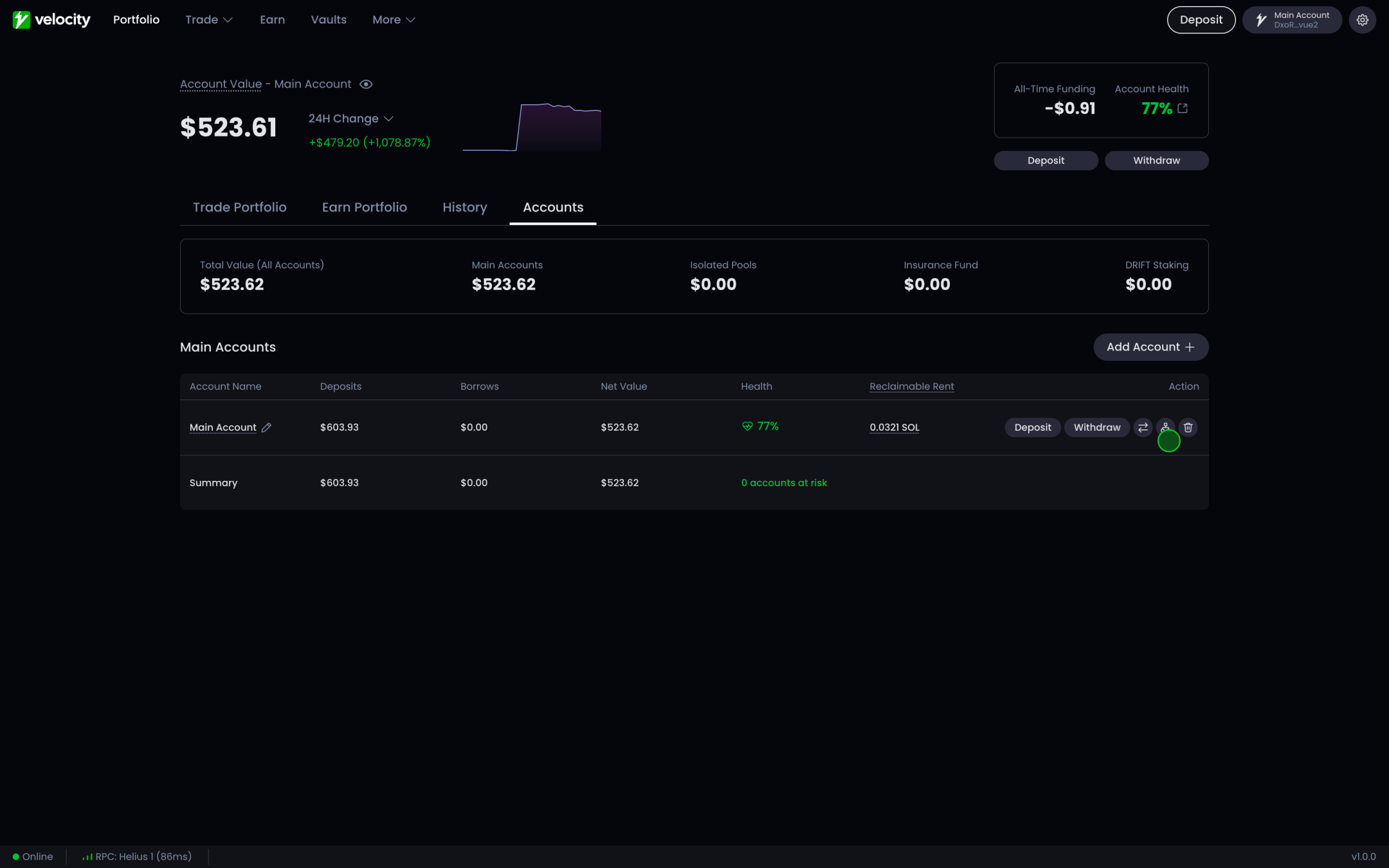
Open the accounts page
Go to the accounts page in your portfolio and find the delegate control on the subaccount you want to delegate. Delegation is per subaccount, so pick the right one before you continue.
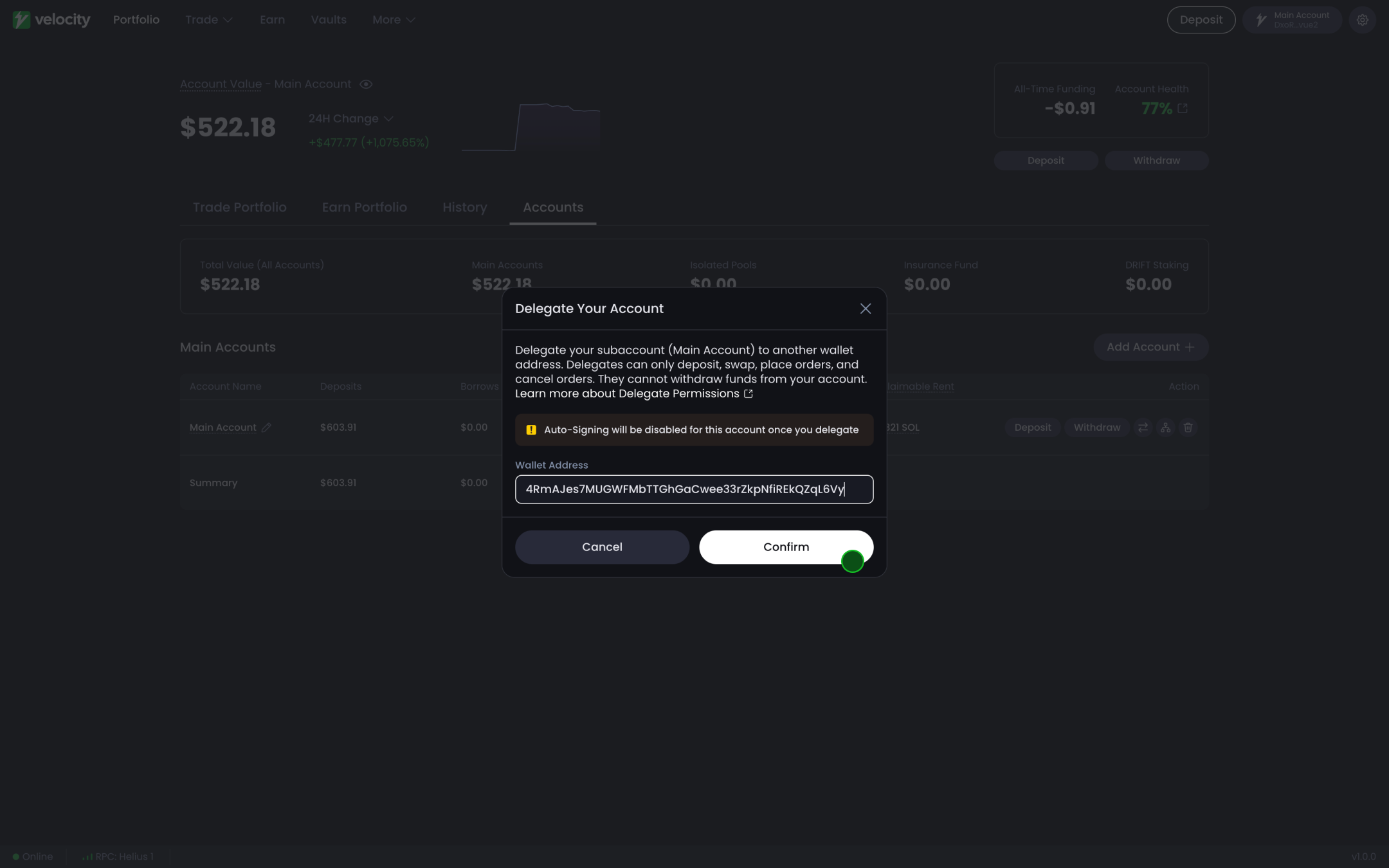
Enter the delegate address and confirm
Paste the Solana address you want to delegate to and select "confirm". Sign the transaction with the owner wallet, the hardware wallet included, since setting a delegate is an ordinary transaction that hardware firmware signs without trouble.
To remove or change a delegate, come back to the same screen and sign again with the owner wallet. A delegate can never do this for itself, which is what keeps a compromised delegate from locking the owner out of the account.